


Live Presentation Instructions
Instructions and Protocols for Online Presentations via Zoom
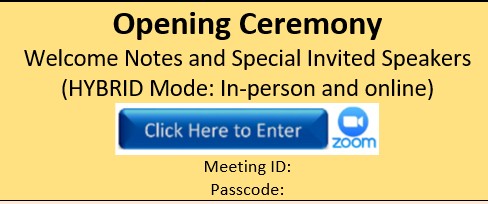
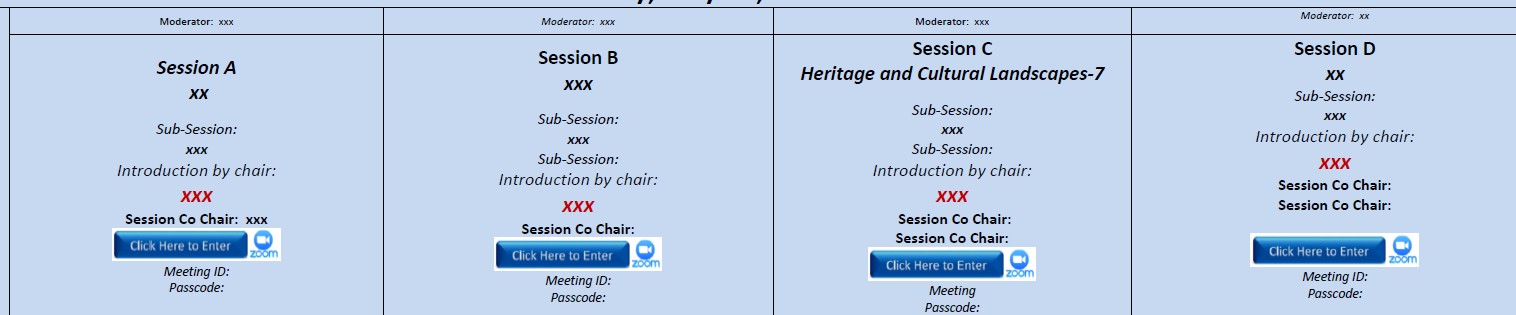
All online presentations will be conducted live via Zoom through parallel sessions: Session A, Session B, Session C, and Session D. Each session will have its own dedicated access button in the Conference Program. Participants may enter the relevant session by clicking the blue “Click Here To Enter” button. The meeting code and ID, together with the activated button, will be sent to the authors one week before the conference.
-If your presentation is in Session C, please scroll up and find the relevant button in the column labeled “Session C,” then click that button to enter the session.
-Each day will have one meeting ID and password. Once you enter Session C on Day 1, you may remain in that session until the end of the day. The same procedure applies to all sessions.
Please note that all times indicated in the Conference Program are based on Türkiye local time. Authors are kindly requested to check the time difference carefully and join their assigned session on time.
Before the Conference Day
To ensure a smooth and professional online presentation, please complete the following preparations in advance:
- Use the official conference PowerPoint template: All presenters are kindly requested to prepare their slides using the official conference PowerPoint template.
- Limit your slides: Presentations should include a maximum of 15 slides to fit comfortably within the allocated presentation time.
- Prepare for the 7-minute presentation: Each presenter should practise in advance and ensure that the presentation can be completed within 7 minutes.
- Prepare for the Q&A session: A live 3-minute Q&A will follow each presentation. Presenters are expected to answer questions clearly and succinctly.
- Install and update Zoom: Please install the latest version of the Zoom client before the conference and test it in advance.
- Check your Zoom account and profile name: Ensure that your full name and affiliation are clearly displayed in the Zoom participant list so that session chairs and assistants can record attendance accurately.
- Test screen sharing: Practise sharing your PowerPoint file through Zoom before the event. Please make sure you know how to start and stop screen sharing.
- Test your microphone and webcam: Use Zoom’s built-in audio and video diagnostics one day before the conference to ensure that your microphone and webcam are working properly.
- Use suitable audio equipment: It is recommended to use headphones with an integrated microphone to reduce echo and background noise.
- Check your internet connection: A wired or stable high-speed internet connection is strongly recommended to avoid interruptions or drop-outs.
- Prepare your presentation environment: Please choose a quiet, well-lit place with a neutral background to minimise distractions.
- Prepare your device: Keep your laptop fully charged and connected to the charger during the session.
- Check your presentation time: Review the Conference Program carefully and confirm the exact time of your presentation according to Türkiye local time.
- Microphone policy: All participants must keep their microphones muted throughout the conference. Authors are allowed to unmute themselves only during their own presentation and the related Q&A session.
- Live presentation requirement: Presentations must be delivered live via Zoom. Pre-recorded video presentations will not be accepted this year.
During the Conference Day
- Join early: Please join your assigned session at least 30 minutes before it starts for an audio-visual check. Participants are also encouraged to join the opening ceremony at least 15 minutes in advance.
- Follow the presentation order: Presentations will proceed sequentially according to the Conference Program. Please follow the instructions of the session chair.
- One presenter per article: Only one presenter should deliver the presentation for each article.
- Wait for your turn: Please begin your presentation only after the previous presenter has completely finished and stopped sharing their screen.
- Screen sharing instructions: Open your PowerPoint file before your turn. When invited by the session chair, click the green “Share Screen” button in Zoom and select only your PowerPoint window, not your entire screen. This will help ensure a clearer and more professional presentation.
- Camera and microphone rules: Please keep your camera on and ensure that you are clearly visible during your presentation and Q&A. All participants must keep their microphones muted throughout the conference and may unmute themselves only when presenting or responding during the Q&A session.
- Time management: Each presentation must be completed within 7 minutes, followed by a 3-minute live Q&A. If the presentation exceeds the allocated time, the session chair may kindly ask the presenter to conclude immediately.
- Best Presentation Award consideration: Time management, clarity, professional conduct, slide quality, and respect for the session schedule may be considered among the criteria for the Best Presentation Award.
- Professional conduct: All participants are expected to maintain a respectful, academic, and professional environment throughout the session. Failure to keep the microphone muted, except during the presenter’s own presentation and Q&A, may be reported by the session chair to the Organizing Committee and may be considered ethical misconduct.
- Technical responsibility: Each presenter is responsible for managing their own presentation, screen sharing, microphone, camera, and internet connection. In case of technical problems or weak connection from the presenter’s side, the session chair may move to the next presenter to keep the session running smoothly.
After the Presentation
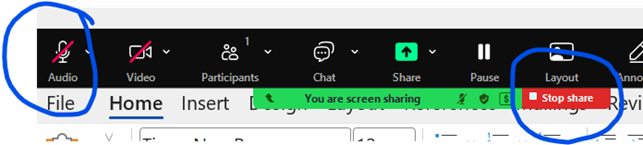
- Stop screen sharing immediately: After finishing your presentation, please stop sharing your screen immediately so that the next presenter can begin without delay.
- Remain available for Q&A: Please remain present and prepared for the 3-minute live Q&A following your presentation. You may keep your microphone unmuted only during your own Q&A discussion.
- Mute your microphone after Q&A: Immediately after your presentation and Q&A are completed, please mute your microphone again and remain muted for the rest of the session.
- Respect the session flow: The online sessions are designed to run with minimal interruption. Your cooperation, punctuality, and responsibility are essential for the success of the conference.
Important Notes
- Zoom links are available inside the Conference Program and will be active only during the scheduled session times.
- All presentation times are based on Türkiye local time.
- Co-authors are welcome to attend the online sessions.
- Due to security regulations, in-person sessions will not be live-streamed.
- Presentations must be delivered live via Zoom; pre-recorded videos will not be accepted this year.
- All participants must keep their microphones muted throughout the conference. Unmuting is permitted only during the participant’s own presentation and Q&A session.
- Failure to follow the microphone policy may be reported by the session chair to the Organizing Committee and may be considered ethical misconduct.
- Failure to follow the online presentation rules may affect publication eligibility.
Thank you very much for your cooperation and support in helping us maintain a smooth, respectful, and professional conference environment.
Frequently Asked Questions for Online Presentations via Zoom
Q: How will the online presentations be conducted?
A: All online presentations will be conducted live via Zoom. The conference will include parallel online sessions named Session A, Session B, Session C, and Session D. Each session will have its own dedicated Zoom access button inside the official Conference Program.
Q: Where can I find the Zoom link for my session?
A: The Zoom access buttons will be available inside the Conference Program. In each session, there will be a blue “Click Here To Enter” button. By clicking this button during the scheduled time, participants will be directed to the relevant Zoom session.

Q: Are all presentation times based on my local time?
A: No. All times shown in the Conference Program are based on Türkiye local time. Authors are responsible for checking the time difference between Türkiye and their own country to ensure they join the correct session on time. Check Current Local Time in Istanbul, Turkey
Q: When should I join my online session?
A: Presenters are kindly requested to join their assigned Zoom session at least 30 minutes before the session starts for an audio-visual check. Participants are also encouraged to join the opening ceremony at least 10 minutes in advance.
Q: Should I use a specific PowerPoint template?
A: Yes. All presenters are requested to use the official conference PowerPoint template when preparing their presentations. This helps maintain a consistent and professional visual identity throughout the conference.
Q: How many slides should my presentation include?
A: Presentations should include a maximum of 15 slides. This limit is recommended to help presenters complete their talk comfortably within the allocated 7-minute presentation time.
Q: How long is each presentation?
A: Each presentation must be completed within 7 minutes. Presenters are strongly advised to practise in advance to ensure that their presentation fits exactly within this time limit.
Q: Will there be a question-and-answer session after my presentation?
A: Yes. A live 3-minute Q&A session will follow each presentation. Presenters should be prepared to answer questions clearly, briefly, and professionally.
Q: Can I submit or play a pre-recorded video instead of presenting live?
A: No. Presentations must be delivered live via Zoom. Pre-recorded video presentations will not be accepted this year.
Q: How should my name appear on Zoom?
A: Your full name and affiliation must be clearly displayed in the Zoom participant list. This is necessary for attendance recording by the session chairs and conference assistants.
Example format: Your Name Surname – Your Manuscript number

Q: Should I keep my microphone muted during the session?
A: Yes. All participants must keep their microphones muted throughout the conference. Authors may unmute themselves only during their own presentation and the related Q&A session. After the Q&A ends, they must immediately mute themselves again.
Q: What happens if a participant does not follow the microphone policy?
A: Failure to keep the microphone muted, except during the participant’s own presentation and Q&A session, may be reported by the session chair to the Organizing Committee. Such behaviour may be considered ethical misconduct and may affect publication eligibility.
Q: Should I keep my camera on during my presentation?
A: Yes. Presenters are requested to keep their camera on and remain clearly visible during their presentation and Q&A session. A quiet, well-lit environment with a neutral background is strongly recommended.
Q: How should I share my PowerPoint presentation?
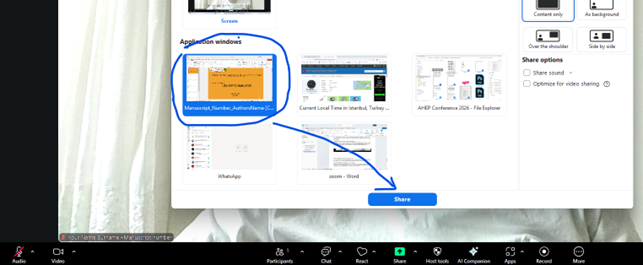
A: Before your turn, please open your PowerPoint file. When invited by the session chair, click the green “Share Screen” button in Zoom and select only the PowerPoint window, not your entire desktop screen. This ensures a clearer and more professional presentation for the audience.
1-Open your PowerPoint file.
2- Click the green button in the center of the Zoom window.
 3-From the application window, select only the PowerPoint presentation that is currently open, then click the “Share” button.
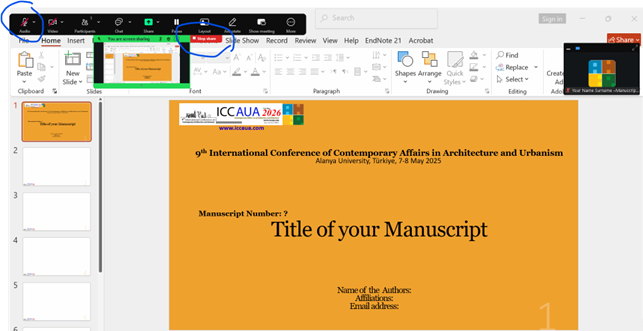
4-Make sure to unmute yourself when you start your presentation.
5- After finishing your presentation, please make sure to stop sharing and mute yourself.
Q: Do I need host permission to share my screen?
A: No. Presenters will be allowed to share their screen without requiring host permission. However, they must wait for the session chair’s instruction and share only when it is their turn.
Q: What should I do after finishing my presentation?
A: After completing your presentation, you must immediately stop sharing your screen so that the next presenter can begin without delay. You should remain available for the 3-minute Q&A session and then mute your microphone again once the discussion is finished.
Q: What happens if I have technical problems during my presentation?
A: Each presenter is responsible for managing their own internet connection, microphone, camera, Zoom access, and screen sharing. In case of a weak connection or technical problems from the presenter’s side, the session chair may move to the next presenter to keep the session running smoothly.
Q: How can I prepare technically before the conference?
A: Presenters should install the latest version of Zoom, test their microphone and webcam using Zoom’s built-in diagnostics, practise screen sharing, and ensure that their PowerPoint file opens properly. It is also recommended to use headphones with an integrated microphone to reduce echo and background noise.
Q: What type of internet connection is recommended?
A: A wired or stable high-speed internet connection is strongly recommended. Presenters should avoid unstable public Wi-Fi or weak mobile connections, as interruptions may affect the quality of the presentation and the timing of the session.
Q: Can co-authors attend the online sessions?
A: Yes. Co-authors are welcome to attend the online sessions. However, only one presenter should deliver the presentation for each article. Please also note that, due to security regulations, in-person sessions will not be live-streamed.


